
Build an Invoice Email Processing AI Agent in 5 simple steps
TL;DR: The invoice email processing AI agent automates invoice data extraction directly from Gmail attachments and syncs the structured data into ERP systems like QuickBooks, Zoho Books, Tally, or Google Sheets. It replaces manual entry with automated invoice processing using AI invoice automation and AI document processing.
Current scenario for invoice processing system
To my observation, one of the clearest examples of this problem shows up in finance and accounting as they still spend hours on invoice data extraction.
Invoices arrive in Gmail.
Attachments get downloaded manually.
Details are typed into spreadsheets or ERP systems.
As the volume climbs, these businesses receive dozens to hundreds of vendor invoices every month, mostly over email.
Invoices come as:
- PDFs
- Scans
- Different formats
- From different vendors
And someone in finance has to open every email, read every PDF, and manually enter data into Excel, Google Sheets, or Tally.
The process tends to be slow, boring, error-prone, and honestly, not an efficient use of skilled accounting time. Industry research echoes this. A recent analysis from Workday highlights how manual invoice processes reduce visibility into cash flow and delay approvals, making it difficult for finance leaders to track liabilities in real time. When invoices sit in inboxes or spreadsheets, reporting becomes reactive instead of proactive.
So we built an invoice email processing AI agent to automate the entire invoice processing workflow.
This blog breaks down how it works, how to build it, and how ops, finance, and admin teams can deploy it safely with guardrails.
The problem: Manual invoice processing slows teams down
If you have ever searched your inbox for “invoice.pdf” at the end of the month, you already know the problem.
Invoices do not arrive neatly. They show up across threads, forwarded chains, scanned attachments, and random subject lines. Finance teams are left stitching together an invoice processing workflow from email, spreadsheets, and ERP screens. That gap between inbox and accounting system is where most accounts payable automation breaks down.
It usually looks like this:
- Invoices buried in Gmail threads
- Someone manually downloading and renaming attachments
- Copy-pasting totals, GST, and vendor names into Excel or ERP
- Switching across fragmented systems, email, ERP software, approvals, confirmations, creating bottlenecks and increasing the risk of missed or duplicate payments (a challenge also highlighted in Tipalti’s research on fragmented AP workflows)
- Managers asking for real-time visibility that does not exist
- Month-end rush with piles of unprocessed invoices
- Small data entry errors that create reconciliation headaches
Traditional invoice processing software still depends on manual checkpoints or fixed templates. It struggles when formats change. Here’s how manual and automated invoice processing compare:
| Area | Manual Invoice Processing | Automated Invoice Processing (AI-Powered) |
| Invoice Intake | Emails manually opened and downloaded | Gmail invoice automation triggers processing automatically |
| Data Entry | Copy-paste into Excel or ERP | AI invoice automation performs invoice data extraction |
| Processing Time | Can take days per invoice | Near real-time automated invoice processing |
| Error Rate | High risk of human data entry errors | AI document processing improves accuracy |
| Visibility | Limited tracking across inbox and spreadsheets | Real-time dashboard visibility via ERP integration |
| Scalability | Requires more staff as volume grows | Scales without proportional headcount increase |
| Format Handling | Struggles with layout changes | Handles PDFs, scans, and multi-format invoices using invoice OCR AI |
AI invoice automation changes that layer entirely. As XSuite notes in its analysis of AI in accounts payable, automation allows finance teams to scale invoice volumes without proportionally increasing headcount. Instead of hiring more staff during growth phases, teams rely on intelligent document processing and AI workflow automation to absorb higher workloads.
What this invoice email processing AI agent does
The invoice email processing AI agent is designed to automate the most time-consuming part of accounts payable: collecting, extracting, and structuring invoice data from email.
Instead of relying on manual invoice processing or rigid templates, this system uses AI invoice automation and AI document processing to turn unstructured invoice emails into structured financial records.
It performs three core actions in a streamlined invoice processing workflow:
- Reads invoice attachments directly from Gmail using trigger-based Gmail invoice automation
- Performs invoice data extraction from PDFs, scanned documents, or image files using AI-powered PDF invoice extraction and invoice OCR AI
- Pushes structured output into your invoice processing system or ERP platform
Once extracted, the structured data can sync with:
- Google Sheets for lightweight logging and visibility
- QuickBooks invoice automation workflows
- Zoho Books integration
- Tally ERP integration
- Any ERP integration via API
This makes it a flexible invoice automation tool that fits into existing finance stacks without disrupting accounting controls.
Importantly, the agent does not replace accounting software. It strengthens it.
Think of it as the intelligent intake layer for your invoice processing system. It ensures that clean, structured data reaches your ERP accurately and in real time, enabling true automated invoice processing across the organization.
Step-by-step: Building the invoice email processing AI agent
If you want to watch the full build walkthrough:
Step 1: Create a new agent
Once you’re inside admin console, create and name your new agent

Step 2: Configure the brain
Select the model. We used GPT-4 for reliable invoice data extraction.
LLMs are critical for interpreting:
- Scanned invoices
- Inconsistent layouts
- Vendor-specific formats
This improves invoice OCR AI performance beyond template systems.
Step 3: Define the invoice processing workflow
In this step, you add the agent instruction. The invoice processing workflow:
- Detect new email
- Download attachment
- Parse file
- Extract seven key fields
- Push structured output to ERP
- Send Slack confirmation
That is full automated invoice processing. But so far if you are building the agent following the blog, I have added the exact instructions below that you can use:
Whatever attachment you receive in the email use the Attachment ID, file name and message id to fetch the attachment and then parse it using the file parser tool and extract the following things from it:
- vendor name
2. Vendor details
3. date of invoice
4. invoice number
5. Description
6. Number of items
7. total amountSend both the above information to slack on the channel: //SLACK CHANNEL ID//
Store the above information to this google sheet: //SHEET LINK//
Note- You can add modify this step for your specific ERP software
Step 4: Add Tools
Authenticate:
- Gmail
- File Parser
- Slack
- Google Sheets or ERP
Tools are what convert AI invoice automation from theory to execution.
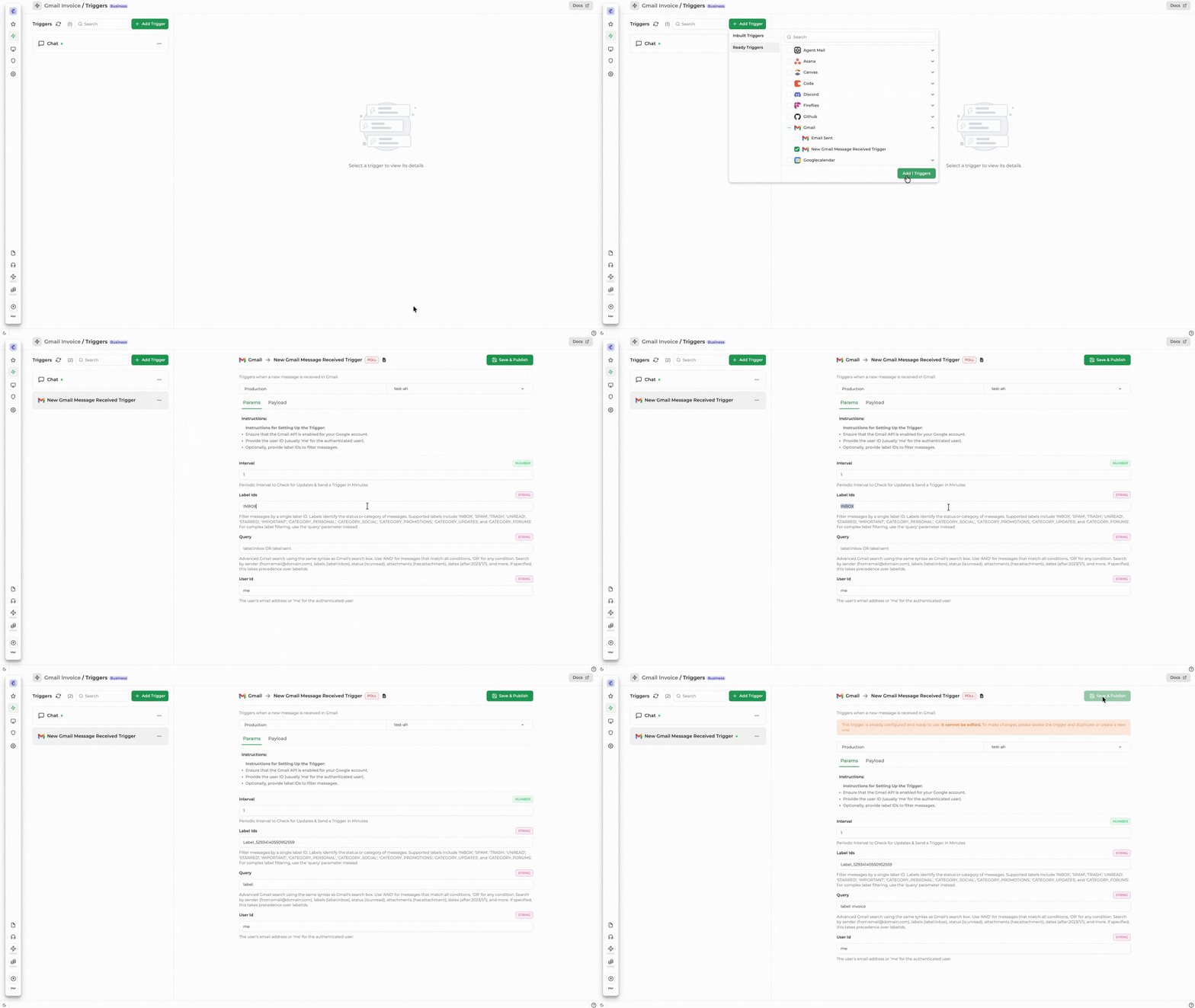
IMP Step 5: Add Trigger
Trigger used: Gmail(new gmail message received trigger)
This step is very important, as it defines how and when your agent will get triggered. With this trigger, you can add the filters and include a label and has:attachment for proper configuration, considering you are receiving invoices in form of attachments.
Step 6: Publish & test
For the agent to work, you will be required to to publish the agent first
What Data Was Extracted
The agent extracted:
- Vendor Name
- Invoice Number
- Invoice Date
- Due Date
- Total Amount
- Tax Amount
- Currency
Structured output ensures smooth ERP integration.
This removes manual invoice data extraction errors.
Real-Time Visibility for Finance Teams
Once published, the invoice processing system:
- Logged data into Google Sheets (which can be any ERP system)
- Sent Slack notification
- Confirmed processing success
Replace Sheets with QuickBooks invoice automation or Zoho Books integration for production usage.
Now, accounts payable automation happens instantly.
Why AI invoice automation works better than Traditional OCR
Traditional invoice processing software relies on templates.
AI document processing adapts dynamically.
Benefits:
- Works across formats
- Handles layout changes
- Reduces configuration time
- Improves invoice OCR AI accuracy
- Supports scalable ERP integration
For ops leaders, this means fewer operational bottlenecks.
Security and Governance Considerations
For industry leaders evaluating AI agent for finance use cases:
- Use scoped API permissions
- Apply trigger-based filtering
- Implement audit logging
- Restrict tool access via guardrails
This strengthens automated invoice processing compliance.
If you are exploring enterprise-grade agent governance, see our guide on building secure AI agents.
ROI of an Invoice Email Processing AI Agent
Let’s quantify.
| Aspect | Manual Invoice Processing | AI Invoice Automation |
|---|---|---|
| Time per invoice | 3–7 minutes | Near real-time extraction |
| Monthly volume (example) | 1,000 invoices | 1,000 invoices |
| Total effort | 50–100 hours of manual work | ~90% reduction in manual effort |
| Accuracy | Risk of human error | Significantly improved accuracy |
| Financial visibility | Delayed reconciliation | Improved cash flow visibility |
| Month-end close | Slower closing process | Faster month-end closing |
Who Should Build This
This invoice email processing AI agent is ideal for:
- Finance teams
- Accounts payable departments
- Operations managers
- Admin teams
- HR teams processing vendor payouts
- Agent builders exploring AI workflow automation
If you are building internal automation tools, you may also want to explore our hands-on agent workshops.
Common Extensions
Once the invoice automation tool is live, you can extend it:
- Duplicate invoice detection
- Fraud flagging
- Vendor validation against master database
- Auto-approval workflows
- Payment trigger automation
That evolves into full accounts payable automation.
Final Thoughts
An invoice email processing AI agent is not about replacing ERP systems.
It is about automating the intake layer.
Email → Extraction → Structured data → ERP integration.
That is modern automated invoice processing.
If you are building agents for finance or operations teams, consider joining one of our live workshops to experiment hands-on or want to self-explore the platform and build agents just set up your account and get 30-day Free Access.
Related Articles