
Build a WhatsApp AI Agent in 30 Minutes (No Code) Using DronaHQ
Your support team closes at 6 PM. Your customers don’t.
They’re messaging you at 11 PM asking about test pricing. They’re trying to book appointments on Sunday mornings. They’re rescheduling while standing in line for coffee. And if you’re running on traditional systems, web forms, phone trees, email ticketing, you’re losing them.
Not because your service is bad. Because your interface is.
In this guide, you’ll build a production‑ready WhatsApp AI agent in under 60 minutes using a no‑code agentic workflow in DronaHQ.
What is a WhatsApp AI agent (and why it beats legacy chatbots)?
A WhatsApp AI agent is an autonomous software system that receives messages via WhatsApp, understands the sender’s intent using natural language processing, and executes multi-step actions, such as searching knowledge bases, booking calendar appointments, or sending confirmations, with human intervention (only when required).
Here’s what most businesses miss: customer effort isn’t about what you offer. It’s about where you make them go to get it.
A clinic might have a beautiful booking portal. But asking someone to leave WhatsApp, open a browser, navigate to a URL, create an account, and fill out a form? That’s six friction points before they even see a calendar. Most don’t finish. They message a competitor instead.
The shift isn’t about better booking systems. It’s about meeting customers in the interface they’ve already chosen.
For the past decade, businesses treated messaging apps as notification channels. Confirmations. Reminders. One-way broadcasts. That model is dead.
WhatsApp has 2 billion active users. It’s not a marketing channel anymore, it’s infrastructure. And the moment you can trigger an AI agent from an inbound message, it stops being a notification layer and becomes a transaction layer.
Here’s the evolution:
| Era | Interface | Limitation |
| 2010s | Web forms, portals | Required app switching, high drop-off |
| 2020s | Chatbots in messaging apps | Rule-based, brittle, frustrating UX |
| Now | AI agents triggered by messages | Understands intent, takes action autonomously |
The difference? Previous chatbots simulated conversation. AI agents complete transactions.
Automation vs Agentic workflows in WhatsApp (quick primer)
Most people hear “automated WhatsApp responses” and think: chatbots. Auto-replies. Canned messages.
That’s not what this is.
Traditional automation follows predetermined paths. If the user says X, do Y. It breaks the moment someone phrases a request differently. It requires you to map every possible variation. It frustrates users because it can’t handle nuance.
Have you experienced this?
You message a business: “Can I move my 3 PM slot to Thursday?”
Bot responds: “I didn’t understand that. Please choose from: 1) Book appointment 2) Cancel appointment 3) Speak to agent”
You try again: “Reschedule”
Bot: “Please provide your booking ID.”
You don’t have it. You wait for a human.
That’s automation. It’s rigid. It breaks under real-world use.
What makes this WhatsApp AI agent different
An AI agent doesn’t follow if-then rules. It understands intent.
Someone messages: “How much for a sugar test?”
The agent knows they mean a blood sugar test. Searches for a knowledge base. Responds with pricing.
Someone says: “I need to see the doctor tomorrow morning.”
The agent understands this is a booking request. Check calendar availability. Offers time slots.
Someone writes: “Can’t make it on the 15th, any chance for the 16th instead?”
The agent recognizes this as a reschedule. Finds their existing appointment. Proposes new times.
The distinction:
| Traditional Automation | Agentic Workflow |
| Keyword matching | Intent understanding |
| Fixed conversation paths | Dynamic responses |
| Breaks on variation | Handles natural language |
| “Press 1 for…” | “Just tell me what you need” |
| Requires extensive mapping | Learns from context |
Automation executes scripts. Agents make decisions.
What a WhatsApp-Triggered Agent Actually Does
I built one for a clinic to test this thesis. Here’s what a no‑code WhatsApp AI agent built in DronaHQ actually does in production:
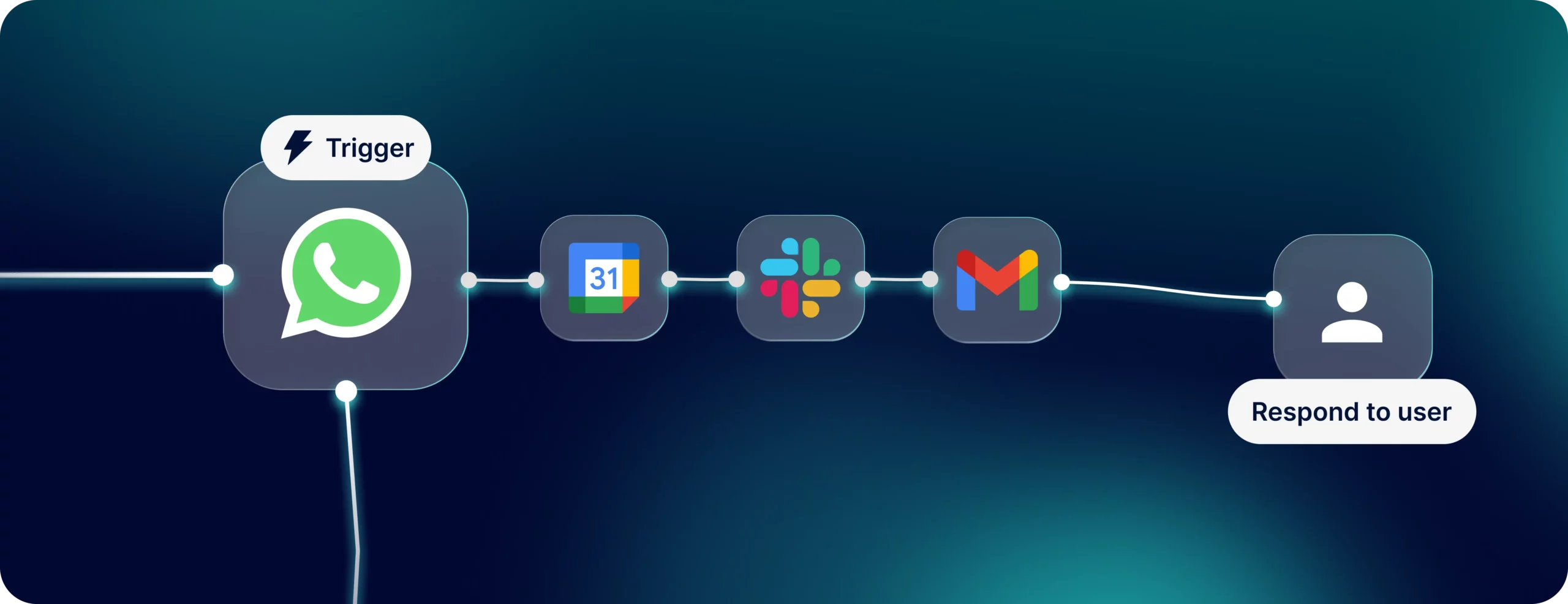
Trigger: Patient sends a WhatsApp message.
Intent Detection: Agent reads the message. Service query? Booking request? Reschedule?
Action:
- Service query → searches knowledge base, returns pricing
- Booking → checks Google Calendar, reserves slot, collects email
- Reschedule → updates calendar, sends new confirmation
Notification Layer: Sends booking details to staff via Slack, email, and WhatsApp.
Total human involvement: zero, unless the agent escalates.
The entire workflow is visual. No backend engineers. No API integrations written by hand. Built in DronaHQ’s agentic platform in a few hours.
Real‑World Use Cases for WhatsApp AI Agents (Clinics, Restaurants, Salons, More)
The clinic is a proxy. The pattern applies anywhere customers initiate service requests via messaging:
- Salons booking appointments
- Repair services quoting jobs
- Tutoring centers scheduling demos
- Legal consultations confirming calls
- Real estate viewings
- Restaurants handling reservations
- Service contractors scheduling estimates
The common thread: high-frequency, low-complexity interactions that don’t justify pulling someone out of their messaging app.
These aren’t edge cases. This is most customer service.
Step‑by‑Step: Build a WhatsApp AI Agent in DronaHQ (No Code)
To build a WhatsApp AI agent without code in DronaHQ, you need three core components: a WhatsApp trigger that activates the agent when messages arrive, an agentic AI layer that understands intent and orchestrates actions, and pre-built integrations to internal databases, or APIs, in this case tools like Google Calendar, Gmail, Slack, and knowledge bases.
Here’s the actual build process. No theory. Just what I did. If you want to watch the full build walkthrough:
Also if you want to explore how teams build AI agents with no code (live), drop by our workshop.
Step 1 – Set Up Your WhatsApp Trigger and AI Instructions
Open DronaHQ’s agentic platform. Creat a new agent workflow. Added the instruction(which you can copy from here)
Add WhatsApp as the trigger. Connect my business WhatsApp number. Every message that comes in now fires the agent.
Time: 5 minutes.

Step 2 – Build the Knowledge Base for Your WhatsApp AI Agent
Create a simple knowledge base with:
- Vaccine pricing (BCG: ₹600, Covishield: ₹1000)
- Doctor consultation fees (Dr. Sharma: ₹500)
- Clinic timings and availability
Uploaded this as a structured document. The WhatsApp AI agent can now search this on demand.
Time: 10 minutes.
Step 3 – Configure Intent Detection (Pricing, Booking, Reschedule)
This is where the agentic layer does heavy lifting.
I didn’t write rules. I just told the WhatsApp AI agent what kinds of queries to expect:
- Service/pricing queries
- Appointment booking requests
- Rescheduling requests
The AI model handles natural language understanding. Someone says “how much is a BCG vaccine” or “BCG vaccine cost?” , it knows both are pricing queries.
Time: 5 minutes.
Step 4 – Connect Google Calendar for Automated Bookings
Next, add Google Calendar integration. Configure it to:
- Check doctor’s availability
- Book slots when requested
- Update existing appointments for reschedules
Use DronaHQ’s pre-built connector. No API keys to manage. Just OAuth and done.
Time: 10 minutes.
Step 5 – Add Email and WhatsApp Confirmations
Connected Gmail tool. When a booking is confirmed, the WhatsApp AI agent:
- Asks for the patient’s email
- Sends a formatted confirmation with appointment details
Again, pre-built connector. Point and click.
Time: 5 minutes.
Step 6 – Configure Staff Notifications (Slack, Email, WhatsApp)
Added three notification actions:
- Post to designated Slack channel with booking details
- Send email to clinic admin
- Send WhatsApp confirmation to patient
All three fire automatically after a successful booking.
Time: 10 minutes.
Step 7 – Design the Visual Conversation Flow (No Code)
This is visual workflow design. I mapped:
If message → detect intent
- Intent = pricing query → search knowledge base → return result
- Intent = booking → check calendar → offer slots → collect email → confirm → notify
- Intent = reschedule → find existing appointment → check new availability → update → notify
The platform shows this as a flowchart. You drag, drop, connect nodes.
Time: 20 minutes.

Step 8 – Test and Deploy Your WhatsApp AI Agent
Sent test messages from my phone:
- “How much is a BCG vaccine?” ✓
- “I want to book for tomorrow at 10 AM” ✓
- “Can I move my appointment to Thursday?” ✓
All worked. Deployed live. This is a complete WhatsApp AI agent, built end‑to‑end in under 60 minutes, with no code.
Time: 15 minutes.
Cost: No enterprise licenses. No custom development.
What I Didn’t Have to Do
No API documentation reading. No webhook configuration. No error handling logic. No database setup. No server provisioning.
The platform abstracted all of it.
The operational shift
What changes when this becomes your default interface?
Support load compresses. Repetitive queries, pricing, availability, rescheduling, disappear from your queue. Your team handles exceptions, not routine requests.
Response time flattens. Midnight enquiries get answered immediately. No queue. No business hours. The agent is always on.
Lead capture tightens. Every inbound message is logged, categorized, and actioned. Nothing falls through cracks because someone forgot to check the inbox.
Data quality improves. Structured capture happens at the point of contact. You’re not cleaning data later; the agent forces structure upfront.
This isn’t incremental. It’s a different operating model.
The automation frontier nobody built yet
Here’s what most companies are still doing: they automate internal workflows, approvals, data syncs, reporting pipelines.
That’s fine. But the higher-leverage play is automating the customer-facing workflow at the entry point.
Because that’s where effort compounds. Every avoided friction point multiplies across thousands of interactions. Every instant response prevents a lost lead. Every automatic confirmation reduces no-shows.
The irony is that the tooling finally exists to do this without engineering armies. Visual workflow builders. Pre-built integrations. AI agents that don’t need training data to understand “I need to move my appointment to Thursday.”
The infrastructure gap has closed. The adoption gap hasn’t.
Cost, time, and build‑vs‑buy for WhatsApp AI agents
Here’s what usually stops companies from deploying this kind of system:
- Cost. Enterprise automation platforms run $50K+ annually. Custom development costs six figures.
- Complexity. Integrating WhatsApp + AI + Calendar + CRM + Email traditionally requires engineering teams and months of work.
- Maintenance. Every API change breaks something. Every new use case requires new code.
The shift happening now: platforms that give you agentic capabilities without writing code or buying enterprise licenses.
Visual workflow builders. Pre-built connectors. AI layers that handle natural language out of the box. You’re not buying software. You’re assembling intelligence.You could build this from scratch. String together Twilio, OpenAI, Google Calendar APIs, Slack webhooks. Write the orchestration logic. Handle error states. Maintain it. Budget: $100K+ in development. Months of work. Ongoing maintenance costs.
Or you use a platform like DronaHQ that gives you visual workflows, pre-built connectors, and an agentic layer that handles intent without brittle rule trees. Build time: 60 minutes. Cost: a fraction of custom development. Maintenance: handled by the platform. The math is obvious. Unless you’re in the automation business, building this yourself is technical debt disguised as differentiation.
What happens next
The businesses that move first on this aren’t waiting for perfect AI. They’re deploying agents that handle the 80% of interactions that don’t need human judgment.
The businesses that wait are optimizing their web portals and wondering why customers keep texting them instead.
This isn’t a future trend. It’s operational table stakes.
Your customers are already on WhatsApp. The question is whether you’ll meet them there with an agent that actually understands them, or keep sending automated responses that make them want to speak to a human.
The technology exists. The interfaces are ready. The customers are waiting.
What’s missing is the decision to deploy.
You can also read more on how agentic AI is designing the expeiences of a modern traveller.
Explore how AI agents in WhatsApp is reshaping online travel booking.
Frequently Asked Questions
How do I build a WhatsApp AI agent without coding?
You can build a WhatsApp AI agent without coding using DronaHQ’s agentic platform, where you configure the AI model, set instructions, upload a knowledge base, and select pre-built tools like Google Calendar and Gmail and select Whatsapp Trigger in th etrigger section which is set to trigger on receiving messages on Whatsapp. The DronaHQ WhatsApp agent builder handles the orchestration, most users deploy a production-ready WhatsApp AI agent in 30–60 minutes using this no-code approach.
Can I build a WhatsApp AI agent in under 60 minutes?
Yes, you can build a fully functional WhatsApp AI agent in 30–60 minutes using DronaHQ’s no-code agentic platform. The DronaHQ WhatsApp agent builder lets you configure WhatsApp triggers, set AI instructions, connect your knowledge base, and select tools, no backend development required.
What’s the difference between a WhatsApp chatbot and a WhatsApp AI agent?
A WhatsApp chatbot follows fixed, rule-based paths using keyword matching, while a WhatsApp AI agent built in DronaHQ’s agentic platform understands intent through natural language processing, stateful interaction and triggering the right tools. The DronaHQ WhatsApp agent builder uses agentic AI that makes decisions, not rigid scripts.
What tools do I need to build a WhatsApp AI agent in DronaHQ?
To build a WhatsApp AI agent in DronaHQ, you need a WhatsApp Business account, a knowledge base document, and select from pre-built tools like Google Calendar, Gmail, or Slack within the platform. The DronaHQ WhatsApp agent builder provides no-code tool selection and configuration, you can deploy a complete agent in 30–60 minutes.
Can I use this WhatsApp AI agent for bookings, pricing, and reschedules?
Yes, a WhatsApp AI agent built in DronaHQ handles bookings, pricing queries, and reschedules autonomously by selecting the appropriate tools based on user intent. The DronaHQ WhatsApp agent builder searches knowledge bases, accesses Google Calendar, and processes reschedules, all configured in 30–60 minutes.
Related Articles