
Best Relevance AI alternatives in 2026
If you are searching for Relevance AI alternatives, you are probably past the stage of asking “can AI help my team?” and asking something harder: “which platform will actually stick?”
This guide covers the best tools like Relevance AI, with honest pros, cons, pricing, and who each one actually suits. I tested each platform across real workflows including lead automation, employee onboarding, research pipelines, and internal dashboards.
What is Relevance AI (and why teams look for alternatives)
Before jumping to alternatives, it is worth understanding what Relevance AI does and where it starts to show its limits. That context shapes which alternative is actually right for you.
What Relevance AI does
Relevance AI is an AI agent platform built for knowledge work automation. It lets teams create AI “teammates”, agents that can research, analyze, write, and route tasks. It is particularly strong for workflows involving document analysis, multi-step reasoning, and agent pipelines where one agent hands off work to another.
Its core strengths include:
– Chain-of-thought transparency: agents show their reasoning step by step, which builds user trust
– Multi-agent pipelines: you can chain agents (e.g., research → analysis → writing) and tasks hand off automatically
– Knowledge base integration: connect PDFs, Notion, Google Drive, and other document sources
– Pre-built templates: jump-start common use cases without building from scratch
– Solid LLM flexibility: works across multiple model providers
Relevance AI pricing
Relevance AI starts at $29/month with a free tier available. Pricing is credit-based, where both actions and storage consume credits. Advanced integrations are locked behind higher-tier plans.
Why teams look for alternatives
Relevance AI is a capable platform. But based on testing and user feedback, three recurring frustrations emerge:
1. Unpredictable costs. The credit-based model makes it hard to forecast monthly spend. Workflows that spike in volume, or agents querying large knowledge bases, can exhaust credits and pause mid-run. Teams frequently report needing top-ups they did not anticipate.
2. Agents need ongoing babysitting. Multiple users note that agents which perform well initially start producing inconsistent outputs over time, especially for data-heavy or externally-sourced workflows. Maintaining reliability requires regular prompt tuning and retesting.
3. Limited deployment flexibility. Relevance AI runs as a managed cloud service. Teams in regulated industries or with strict data residency requirements often need self-hosting or VPC deployment, which Relevance AI does not support.
4. Thin pre-built agent library. If your use case falls outside the available templates, you are building from scratch. For teams without deep technical resources, this adds friction.
If any of these resonate, keep reading.
What to look for in a Relevance AI alternative
Before choosing a replacement, anchor your decision on what actually matters for your team:
Usability: Can non-technical team members build and use it without constant engineering support?
Integration depth: Does it connect to your actual stack: your CRM, databases, internal APIs, Slack, and cloud storage?
Control and customization: Can engineers extend it when your use case goes off-script?
Output reliability: Are results structured and consistent enough to act on, or do they need regular human review?
Transparency and governance: Can you audit what the agent did, why, and when? Critical for regulated industries.
Pricing predictability: Can you model costs before you scale?
Comparison table: Best Relevance AI alternatives (2026)
| Platform | Starting Price | Free Plan | Best For |
| DronaHQ | From $5 (pay-as-you-go) | Yes | Enterprise AI agents inside internal tools |
| Lindy AI | $49.99/month | Yes | High-frequency task automation, non-technical teams |
| Gumloop | $37/month | Yes | Visual AI workflows, marketing and growth |
| LangChain | Open source | Yes | Custom AI systems for engineering teams |
| Flowise | Free (self-hosted) | Yes | Open-source RAG prototyping |
| Retool | Paid with free tier | Yes | Traditional internal tools and dashboards |
Quick map by need:
AI agents with enterprise governance→ DronaHQ
Simple, fast automation → Lindy
Visual workflow building → Gumloop
Full code-level flexibility → LangChain
Open-source prototyping → Flowise
Traditional dashboards + some AI → Retool
1. DronaHQ
Pricing: Pay-as-you-go starting at $5 (~2,500 AI credits). Custom enterprise pricing available.
Free plan: Yes ($5 worth of credits included)
Best for: Mid-to-large enterprises running AI agents across multiple systems with governance requirements
Where it fits
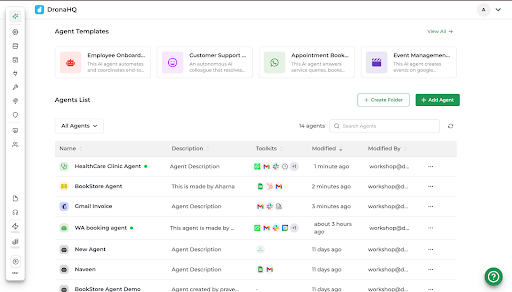
DronaHQ fits as an enterprise-grade agent orchestration platform, a platform for building, deploying, and governing AI agents that are deeply integrated with business systems. It goes beyond standalone agent frameworks by providing everything needed to operationalize AI: UI, workflows, memory, governance, and observability.
Rather than running AI agents as separate backend services, DronaHQ embeds them directly into enterprise applications, dashboards, admin panels, and operational workflows, making AI outputs immediately actionable within the tools teams already use.
That distinction matters. Most AI agent platforms focus on backend orchestration and leave the output question unanswered: what does the operator actually do with it? DronaHQ focuses on that interface layer too.
Typical use cases include:
– Supply chain, inventory management, HR onboarding, finance and support tooling agents
– Admin panels with AI-assisted decision support
– Operations dashboards that surface AI recommendations inline
– Internal workflows that combine APIs, databases, and AI agent outputs
What I Built
I built an employee onboarding agent in about 30 minutes with zero code. The agent pulls employee details from Google Sheets, fills gaps by asking clarifying questions, it holds real back-and-forth conversations, which surprised me, sends welcome emails, schedules calendar invites, posts to Slack, and hands everything to IT for access provisioning.
The interface has three components: [1] Instructions define agent behavior. Clarity matters enormously here, vague instructions lead to agent assumptions that derail outputs. Spend time here. [2] Tool connections work through OAuth, so there is no API key management. [3] Knowledge base handles PDFs. I uploaded employee handbooks and policy documents, and the semantic query capability added recently makes retrieval noticeably more accurate.
Pros
– Accelerated development with AI-powered copilot Artisan, that quickly build AI agents and internal tools using natural language, directly within the platform
– 4,000+ tool integrations without API key management, plus multiple built-in triggers
– Audit trails and governance built in, full transparency into every agent action and the reasoning behind it
– Context management for multi-turn conversations that reference previous threads
– Playground for rapid testing so you can iterate on agent behavior without deploying to production
Cons
– Small marketplace of pre-built agents means most custom use cases start from scratch (though the high customizability offsets this)
– Not ideal for indie developers or small teams with minimal governance needs, the enterprise infrastructure can feel like overhead
Why it beats Relevance AI for enterprise
Where Relevance AI focuses on knowledge work pipelines, DronaHQ outperforms Relevance AI for enterprise use cases by focusing on operational deployment rather than just output generation. It embeds AI agents directly into applications, dashboards, and workflows where teams can act on results in real time. This makes it better suited for organizations that need AI to drive day-to-day operations, not sit alongside them. Additionally, its built-in governance, audit trails, and transparency provide the level of control required in regulated environments—closing a critical gap for enterprise adoption.
2. Lindy AI
Pricing: $49.99/month
Free plan: Yes (limited tasks)
Best for: Small-to-medium teams wanting immediate productivity gains on repetitive workflows
Where it fits
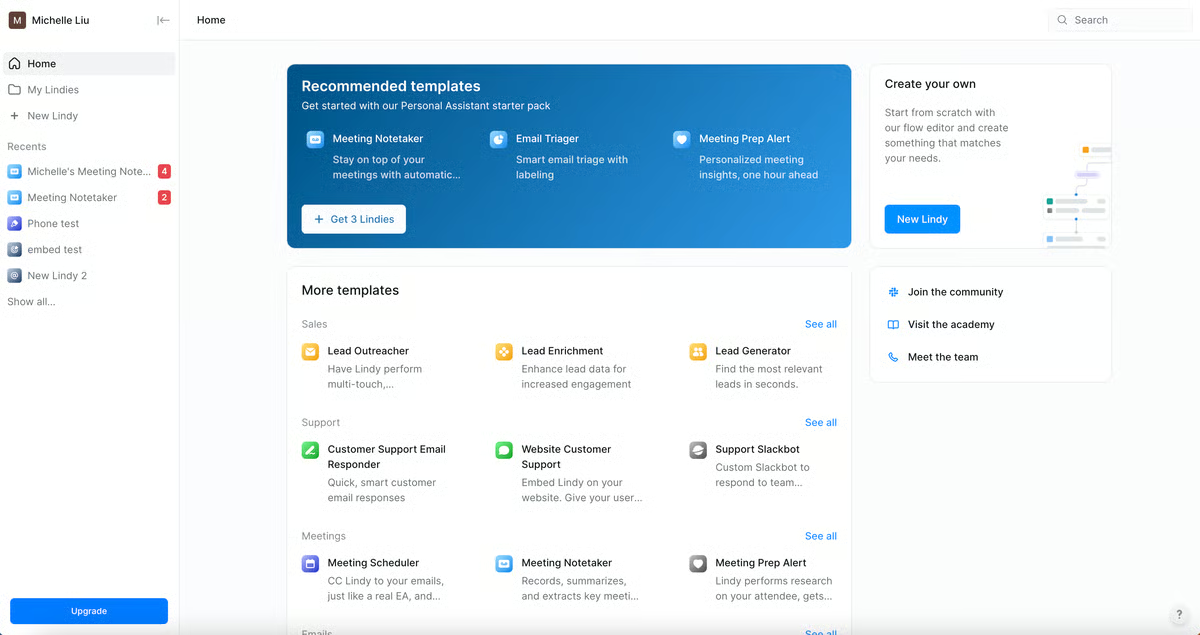
Lindy positions itself as an “AI employee” platform. Its defining feature is prompt-to-agent: describe in plain English what you want automated, and Lindy generates the entire workflow. No canvas mapping, no node configuration, no manual orchestration.
Common use cases: email triage and responses, meeting summaries, CRM updates, lead qualification routing, and support ticket classification.
What I Built
I described a workflow in plain English: “Research incoming leads, qualify based on company size and industry, send personalized emails, update HubSpot.” Lindy generated three agents, research, qualification, outreach, and configured them to collaborate without manual handoff logic. When the research agent returned incomplete data, the qualification agent adapted and used alternative signals. I did not program that behavior.
Pros
– Fastest setup of any platform tested, working agent in under 60 seconds for standard use cases
– Multi-agent collaboration with automatic task handoffs
– 3,000+ integrations with SOC 2 and HIPAA compliance
– No canvas or node mapping, accessible to non-technical users
Cons
– High autonomy means agents occasionally make unexpected decisions; plan for monitoring overhead
– Costs scale with usage, high-volume workflows can get expensive
– Phone numbers are US-only and cost an additional $10/month
– Voice latency on calls can feel awkward with some models
Why it beats Relevance AI for simple automation
Lindy’s setup speed is unmatched for standard business tasks. Where Relevance AI requires more deliberate pipeline design, Lindy’s natural language approach gets a working agent running faster, especially for use cases that fit its template library.
3. Gumloop
Pricing: Free plan; paid from $37/month
Free plan: Yes
Best for: Marketing, growth, and operations teams wanting fast AI-powered workflow automation
Where it fits
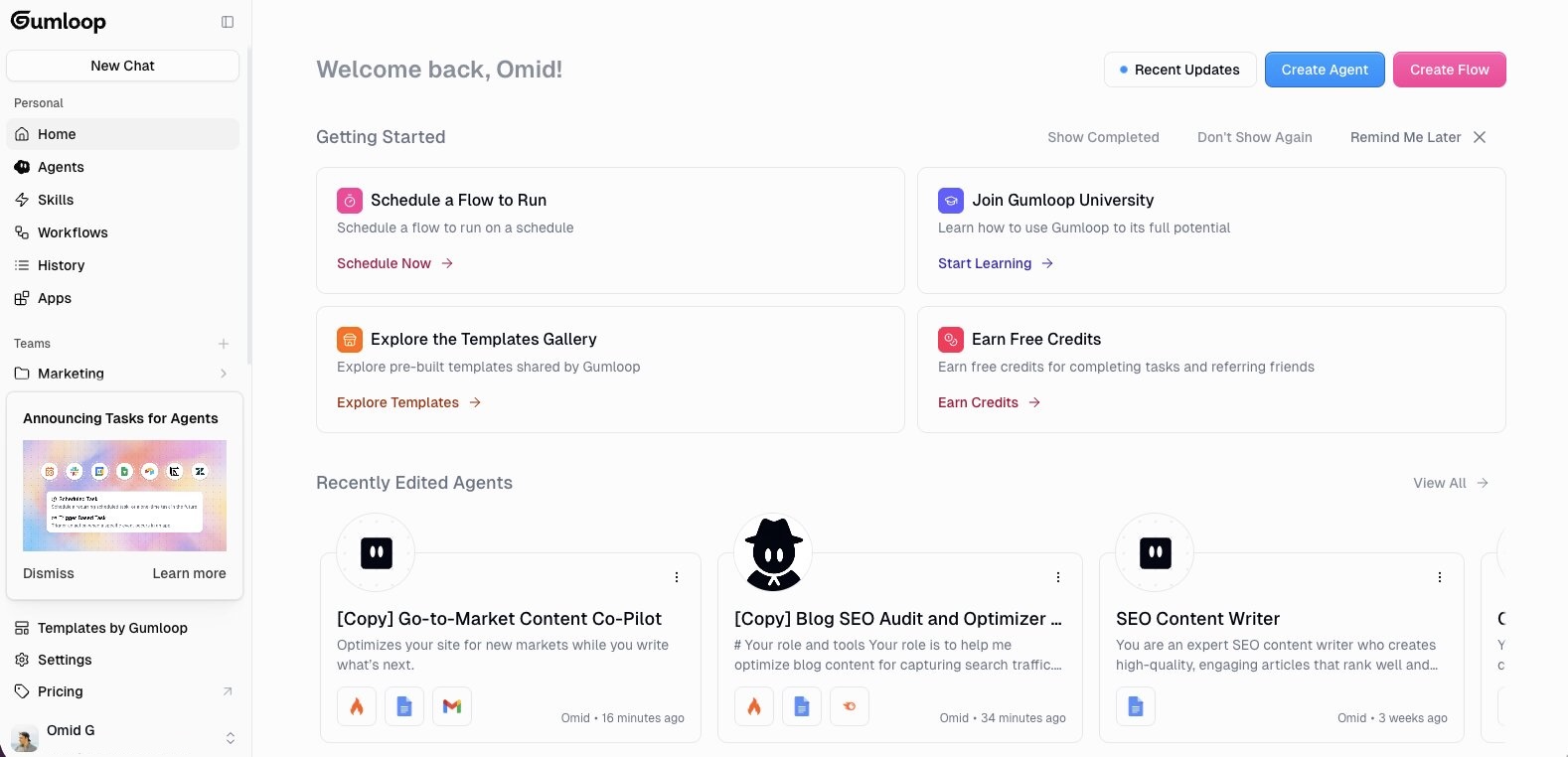
Gumloop provides a visual drag-and-drop environment for building AI workflows, similar to Zapier but with deeper AI integration. It supports multiple LLMs (GPT, Claude, DeepSeek, and others) without requiring you to manage your own API keys.
Its “Gummie” AI assistant can build workflows from a natural language description, and workflows can be nested inside each other, enabling more complex agentic behavior.
Common use cases: marketing data pipelines, content generation flows, competitive monitoring, lead enrichment, and growth experiments.
Pros
- Drag-and-drop interface with AI-assisted workflow building
- Access to premium LLMs without managing API keys
- Good integration ecosystem with a growing template library
- Fast to iterate, build, test, and adjust in one interface
Cons
- Not designed for building full internal applications with custom UI
- Complexity management becomes harder as workflows grow and nest deeply
- End-user UI is minimal, better as a backend automation layer
Why it beats Relevance AI for Marketing and Growth Teams
Where Relevance AI is built for knowledge worker pipelines, Gumloop is faster and more visual for cross-tool automations. Marketing teams in particular find the drag-and-drop approach more intuitive than Relevance AI’s agent-first design.
4. LangChain
Pricing: Open source (free)
Free plan: Yes
Best for: Engineering teams building production-grade custom AI systems
Where it fits
LangChain is a developer framework, not a no-code or low-code tool. It gives engineers full control over how AI agents are architected, retrieval pipelines, multi-step reasoning, tool use, custom integrations, and memory management.
It is the foundation many production AI systems are built on, particularly applications that need fine-grained control over LLM behavior or that combine multiple AI models and data sources in non-standard ways.
Use cases: complex multi-agent systems, custom RAG pipelines, fine-grained tool orchestration, and any workflow where the out-of-the-box behavior of managed platforms is not sufficient.
Pros
- Complete architectural control, build exactly what you need
- Strong open-source ecosystem and active community
- Works with every major LLM provider
- No vendor lock-in on infrastructure or pricing
Cons
- No built-in UI, you are building everything
- High engineering effort and maintenance overhead
- Slower time to value than managed platforms
- Debugging complex agent chains requires significant expertise
Why it beats Relevance AI for engineering teams
Relevance AI abstracts away complexity, which is a benefit until your use case hits its ceiling. LangChain has no ceiling, the trade-off is that you own the complexity entirely. For engineering teams who need that control, it is the right call.
5. Flowise
Pricing: Free (self-hosted); $35/month for managed cloud
Free plan: Yes (open source)
Best for: Developers prototyping RAG systems and LangChain-based workflows visually
Where it fits
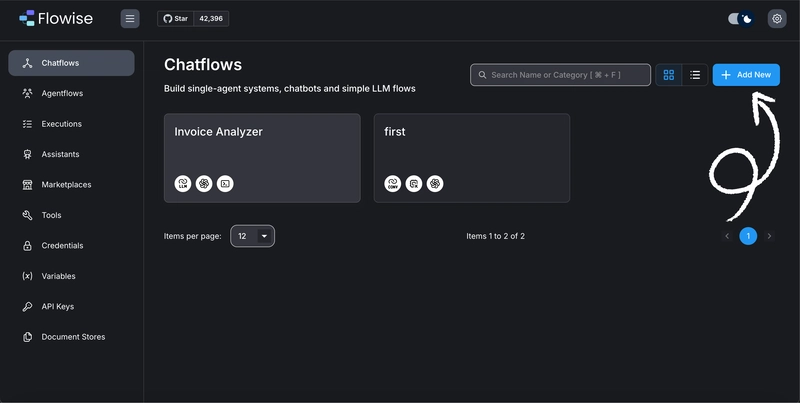
Flowise builds on top of LangChain and provides a visual canvas for creating LLM application flows. It bridges the gap between raw LangChain flexibility and the accessibility of managed platforms.
It is a strong choice for developers who want to prototype LLM-powered applications, chatbots, Q&A systems, document retrieval agents, before committing to a managed platform or building production infrastructure.
A notable detail: Flowise was acquired by Workday in August 2024. The long-term open-source roadmap is worth monitoring if you are planning to build on it.
Pros
- Fully open source with complete data control
- Visual builder simplifies LangChain development significantly
- Code export, prototype visually, then hand Python code to a backend team
- Flexible model support across OpenAI, Anthropic, Cohere, HuggingFace, and local models
Cons
- Self-hosting requires Docker, dependency management, and ongoing maintenance
- UI is functional but not polished, complex flows get messy on the canvas
- Agent capabilities are less mature for multi-step autonomous workflows
- Not consistently production-ready out of the box
Why it beats Relevance AI for Prototyping
Flowise lets you experiment at zero cost with full data control, neither of which Relevance AI offers. For developers validating AI workflow ideas before investing in a managed platform, it is a lower-risk starting point.
6. Retool
Pricing: Paid plans with a free tier
Free plan: Yes
Best for: Operations and engineering teams building structured internal dashboards and admin panels
Where it fits
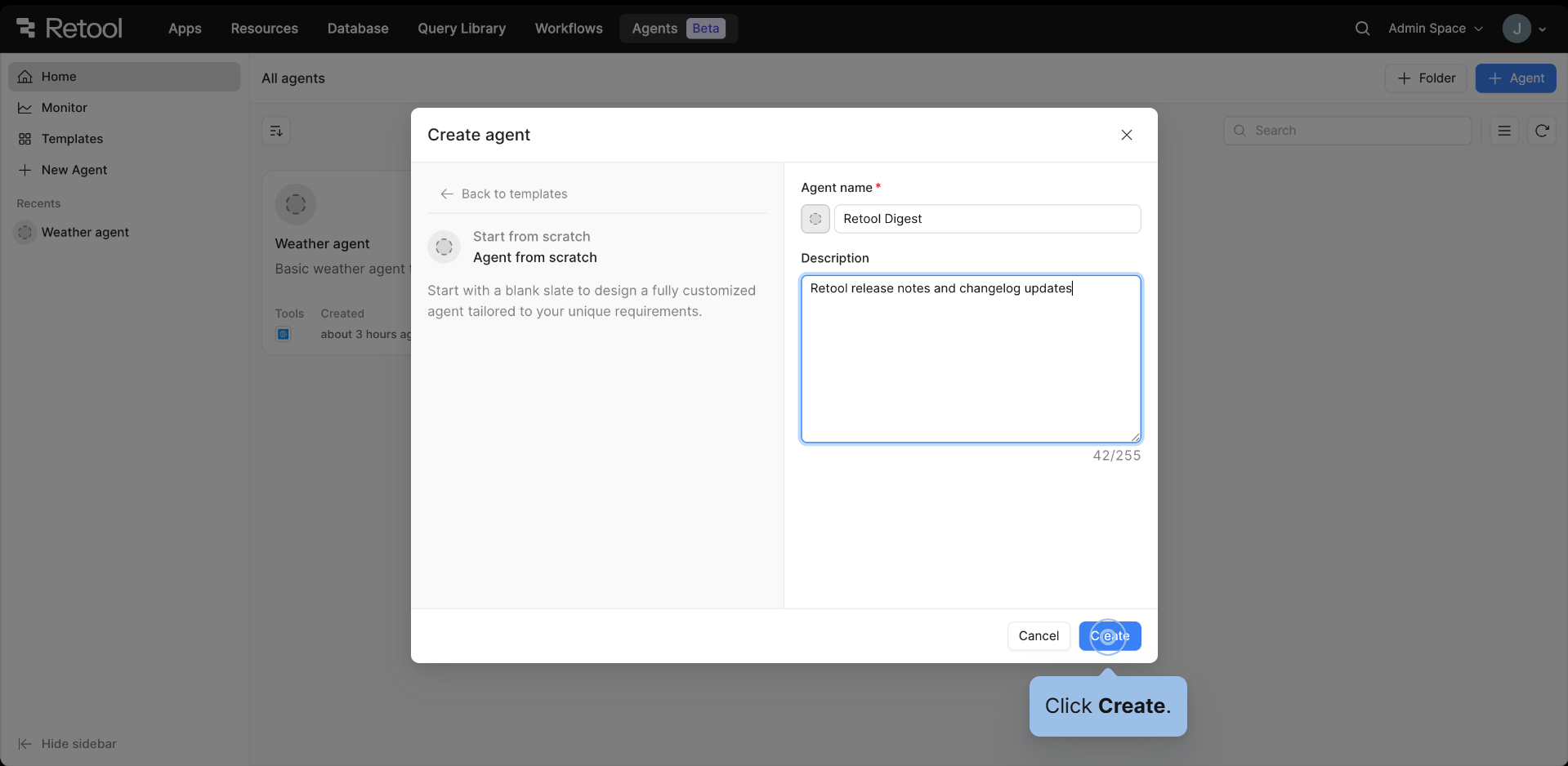
Retool has been the dominant platform for building internal tools, dashboards, CRUD interfaces, admin panels, and database management tools, for several years. It has a mature integration layer and strong enterprise adoption.
AI is not its primary focus. However, for teams that already use Retool for internal tooling and want to layer in AI capabilities, it offers a familiar environment without switching platforms.
Pros
- Mature, stable platform with strong database and API integrations
- Widely adopted with extensive documentation and community support
- Reliable for structured, form-driven internal tools
Cons
- AI is an addition to its core product, not its foundation
- Limited native support for agent-based or autonomous workflows
- Requires additional tooling if AI agents need to be central to the workflow
Why it beats Relevance AI for traditional internal tools
If your need is primarily structured internal tooling, dashboards, data tables, admin interfaces, with modest AI assistance, Retool’s maturity and integration depth are advantages. Relevance AI is built for a different problem.
How to Choose the Right Relevance AI Alternative
Narrow your decision by answering three questions:
- What are you building?
- Standalone automation workflows → Lindy or Gumloop
- AI embedded inside internal tools and dashboards → DronaHQ
- Fully custom AI systems → LangChain
- Open-source prototypes → Flowise
- Traditional internal tools → Retool
- Who will use it day-to-day?
The more non-technical users involved, the more the UI layer matters. DronaHQ, Lindy, and Gumloop are designed with operators and business users in mind. LangChain and Flowise assume engineering ownership.
- What does production look like?
If you are deploying to multiple teams, need audit trails, or operate in a regulated industry, governance features are non-negotiable. DronaHQ and Lindy (SOC 2 / HIPAA) are strongest here. LangChain and Flowise give you full control but require you to build governance yourself.
Frequently Asked Questions
What is Relevance AI used for? Relevance AI is used to build and orchestrate AI agents for knowledge work, research, analysis, writing pipelines, and multi-step task automation. It is particularly strong for workflows where transparent reasoning and document-based knowledge retrieval matter.
What are the best Relevance AI alternatives in 2026? The strongest alternatives are DronaHQ (for enterprise internal tools), Lindy AI (for fast no-code automation), Gumloop (for visual workflow building), LangChain (for engineering teams), and Flowise (for open-source prototyping). The right choice depends on your technical resources, scale, and whether you need AI embedded in tools versus running as standalone automation.
Which AI agent platform is best for internal tools? DronaHQ is best suited for this because it combines AI agent orchestration with custom interface design, allowing operations and business teams to interact with AI outputs through dashboards and panels, not just API responses.
Which platforms support self-hosting? LangChain, Flowise, and n8n are self-hostable. DronaHQ also supports self-hosted deployment for enterprise customers. This matters for teams with data residency requirements or compliance obligations.
How do I migrate from Relevance AI to another platform? Start by mapping your existing agent workflows: what tools they connect to, what data they use, and what outputs they produce. Platforms like DronaHQ and Lindy offer onboarding support for teams migrating from other agent builders. For LangChain-based migrations, Flowise can help prototype the logic visually before a full backend rebuild.
Final Thoughts
The conversation around AI agent platforms has shifted. In 2024, the question was whether you could build an agent. In 2026, the question is whether that agent actually gets used, reliably, by your team, inside workflows that matter.
Different platforms solve different parts of that problem. Relevance AI handles knowledge work pipelines well. Lindy and Gumloop lower the barrier for automation. LangChain provides engineering teams with maximum flexibility. Flowise enables safe experimentation. Retool serves teams that already live in internal tools.
DronaHQ addresses the part that often goes unresolved: making AI usable inside real operational workflows, with the governance infrastructure that production deployment requires.
If you are still experimenting, almost any platform on this list can help. If you are moving toward production, the decision becomes about reliability, integration depth, and team adoption, and that is where the real differences show up.
Related Articles