
Shadow AI Apps: How to Find, Secure and Govern Vibe-Coded Internal Tools
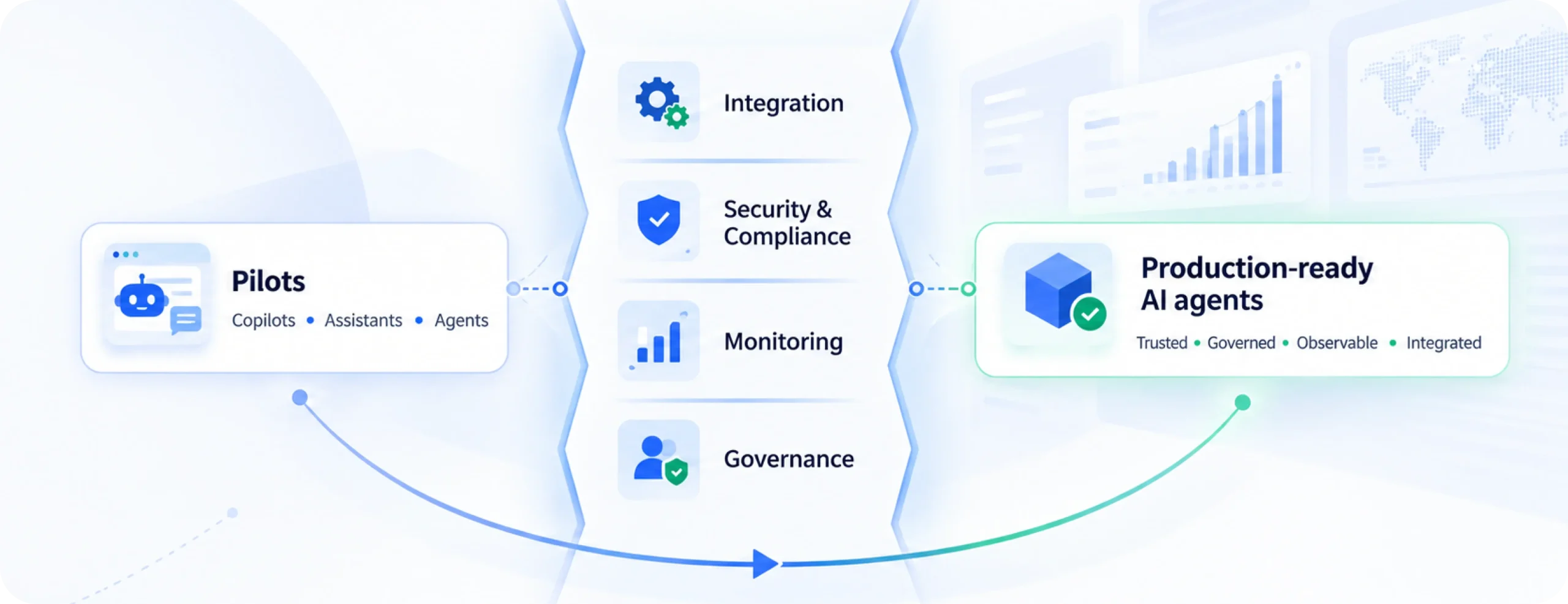
Shadow AI apps are internal tools that employees build with AI app builders like Lovable, Bolt or Replit, without IT review or a named owner. Vibe coding governance is how enterprises discover these applications, assess their risks and move business-critical tools into environments where access, data connectivity and deployment can be managed. This guide covers three steps: discover shadow AI apps, classify them by risk, and migrate important applications onto a governed runtime.
In May 2026, security firm RedAccess identified around 380,000 publicly accessible assets built using vibe-coding and deployment platforms. Approximately 5,000 contained sensitive corporate information, including financial records, customer information and healthcare-related data. Axios independently verified several exposed applications.
Most of these applications weren’t hacked. In several cases, applications were publicly accessible because their privacy settings had not been configured correctly.
That’s the emerging enterprise problem. An employee can build and deploy a working internal application over a weekend, connect it to company data and share it with colleagues. IT may not know the application exists until something breaks or sensitive information is exposed.
Banning AI coding tools isn’t a sustainable answer. Employees will continue looking for faster ways to solve operational problems.
The better approach is to give teams a governed place to build, connect and deploy applications, where security and operational controls are part of the development process rather than something added after an incident.
Why shadow AI apps are growing now
Three things have changed simultaneously:
- Application creation is faster. AI builders can turn natural-language instructions into functional applications, reducing the technical effort required to create internal tools.
- Applications are touching real business data. Employees are connecting these tools to customer records, HR information, financial data and operational systems.
- Applications are becoming more capable. They increasingly call LLM APIs, interact with external services and execute actions rather than simply displaying information.
The adoption gap is significant. IDC research cited in the Cloud Security Alliance’s research note on the vibe coding governance gap found that 56% of employees use unauthorized AI tools at work, while only 23% use IT-governed alternatives.
The result is a growing category of software that sits outside established development and security processes.
Employees aren’t necessarily trying to bypass IT. They’re solving problems that existing development queues haven’t addressed quickly enough.
A marketing team needs a campaign tracker. Finance needs a vendor payment dashboard. Operations needs an internal order management tool. An AI builder can produce a working version before a traditional development request gets prioritized.
The problem begins when these experiments become business-critical applications without an equivalent level of governance.
How shadow AI apps differ from shadow IT
Shadow IT traditionally meant employees adopting unapproved SaaS products. Shadow AI apps change the problem because employees are now creating software themselves.
There are four important differences:
- The platform may be approved, but the application isn’t. Employees can build applications on sanctioned platforms like Power Platform or ServiceNow without the individual applications receiving security review.
- There may be no clear ownership or development history. An application can exist as a deployed service without a documented owner, dependency inventory or record of how it was created.
- Fixes may involve regenerating the application. When a flaw appears, developers may ask an AI tool to rebuild or modify the application without fully understanding the original implementation.
- Compliance follows the data. GDPR, HIPAA and other applicable requirements depend on the data an application handles, not whether it was built by a professional engineering team or an AI assistant.
This creates a visibility problem for security teams. Monitoring approved software vendors is no longer enough. They also need to understand what employees are building on those platforms.
Why vibe-coded internal tools are risky: a reality check
The security concerns are supported by several independent findings.
- AI-generated code can contain security flaws. Veracode’s 2025 GenAI Code Security Report tested more than 100 LLMs across 80 coding tasks. Only 55% of generation tasks produced secure code, meaning 45% introduced a known security flaw in the tested scenarios. This is a model-level coding study, not a direct measurement of deployed AI-builder applications.
- Basic web security controls can be missing. A scan of 5,600 vibe-coded applications, cited in the Cloud Security Alliance research note, found widespread gaps in foundational controls, including CSRF protection, security headers and properly scoped access policies.
- Database access policies can expose sensitive records. CVE-2025-48757 documented insufficient Row Level Security configurations in certain Lovable-generated Supabase projects, affecting more than 170 applications.
- Shadow AI can increase the financial impact of breaches. IBM’s 2025 Cost of a Data Breach Report found that organizations with high levels of shadow AI experienced average breach costs $670,000 higher than organizations with low or no shadow AI.
A real-world example illustrates the problem. Researchers at Wiz discovered that Moltbook, a social network for AI agents, had an exposed Supabase database. The investigation found 1.5 million authentication tokens and approximately 35,000 email addresses exposed. The issue involved a publicly accessible database configuration without appropriate Row Level Security policies. Read the Wiz investigation.
The pattern is consistent: AI can generate the screens and application logic, but that doesn’t mean the necessary authentication, authorization and data protection controls have been implemented correctly.
Step 1: Find shadow AI apps
Identify existing applications through a few key signals:
- SSO and OAuth: Usage of AI builders like Lovable, Bolt and Replit.
- Expenses: Subscriptions to AI development platforms.
- Domains and logs: Company-related deployments and traffic to AI platforms or LLM APIs.
Maintain a simple register of each app’s owner, URL, data accessed and authentication method.
Step 2: Classify apps by risk
Group applications based on the data they access and actions they perform:
- Tier 1 – Non-sensitive: Internal dashboards and team trackers. Keep with a named owner.
- Tier 2 – Sensitive: Apps handling customer, employee or financial data. Require SSO, permissions and approved data connections.
- Tier 3 – Agentic: Apps using LLMs or executing business actions. Prioritize review and restrict permissions.
Step 3: Move apps to a governed runtime
Provide a standard environment to build, connect, deploy and manage AI-built applications. Look for:
- Secure connectivity: Managed data connections and server-side credentials.
- Access control: SSO and role-based permissions.
- Lifecycle management: Separate environments, versioning and rollback.
- Visibility: Operational logs and audit trails.
- Deployment flexibility: Support for enterprise infrastructure and network requirements.
The goal is to make the governed environment the natural path from prototype to production.
When evaluating a governed runtime, check that it:
- Supports server-side data connectivity, so database credentials and API secrets aren’t exposed directly to end-user browsers.
- Supports SSO and role-based application access.
- Allows administrators to manage application ownership and permissions.
- Provides audit and operational logs for investigating application activity.
- Supports development, testing and production workflows.
- Maintains version history and provides a rollback mechanism.
- Supports deployment within the infrastructure and network boundaries required by the organization.
Moving an application onto a governed runtime
Once the destination environment is established, migrate applications in five steps.
- Capture the application requirements.
Document the original prompts, screens, workflows, data model, connected systems and user list. The existing application becomes the reference for rebuilding and validating functionality.
- Rebuild or import the application.
Recreate the application in the approved environment. Validate its core functionality against the original rather than assuming that a visually similar interface behaves identically.
- Reconnect enterprise data.
Replace manually uploaded exports and credentials embedded in application code with approved database and API connections. Apply the appropriate access restrictions and test the data flow.
- Configure identity and permissions.
Set up SSO, application roles and data-level authorization. Test the application using different user roles to verify that each user can access only the information and actions permitted to them.
- Rotate credentials and retire the original.
Treat credentials exposed in prompts, code or public deployments as potentially compromised. Rotate them, revoke old access, remove the original deployment and update the application inventory.
The fifth step is frequently overlooked. Migrating an application does not automatically invalidate credentials that were previously exposed.
The governed path: Build where enterprise controls already exist
Migration addresses applications that already exist. But enterprises also need to prevent the same governance gap from appearing with every new application.
The answer isn’t to stop employees from using AI coding tools. It’s to make the approved development path practical enough that teams don’t need to work around it.
Consider the difference between two approaches.
Retrofitting governance: An employee builds an application on an external platform. IT later has to recreate authentication, configure data connections, introduce permissions, establish deployment controls and investigate how the application was originally built.
Governance by design: Developers build within an environment that already provides the application infrastructure and governance capabilities required for internal tools.
In the second approach, teams don’t have to reinvent the same foundations for every application.
The approved path should provide five things:
- A developer-friendly building workflow. Developers should be able to continue using familiar AI coding assistants and tools.
- Managed enterprise data connections. Applications should connect to approved databases and APIs through configured connectors, rather than embedding credentials in prompts or source code.
- Centralized access management. Application access, user roles and permissions should be configured and reviewed through the platform.
- Controlled releases. Applications should have version history, release management and a rollback path.
- Operational visibility. Administrators should be able to investigate connector activity, application changes and relevant audit events.
This is the approach DronaHQ takes by connecting AI-assisted application development with an enterprise application platform.
How DronaHQ brings AI-assisted development and governance together
DronaHQ connects AI coding clients to its application platform through MCP (Model Context Protocol).
With DronaHQ MCP, developers can connect tools such as Claude Code, Codex, Cursor, Windsurf and VS Code to DronaHQ Studio. Instead of having an AI agent generate frontend code that must then be connected to a separate application backend, developers can use the DronaHQ MCP workflow to create and deploy internal applications on the platform.
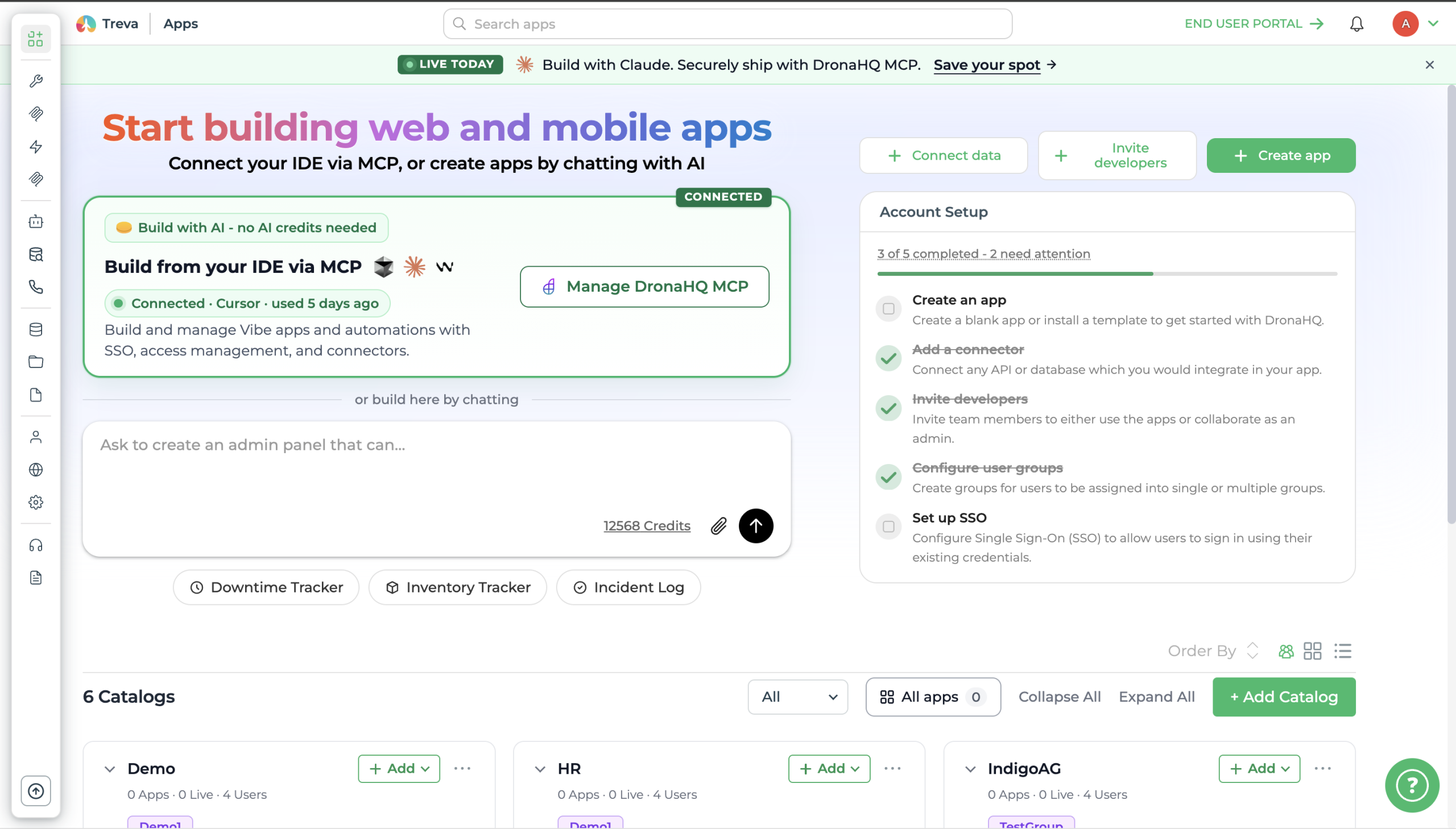
The distinction is important: the AI coding assistant helps create the application; DronaHQ provides the platform capabilities needed to connect, manage and deploy it.
Here’s how that addresses the governance requirements.
- Keep enterprise credentials out of prompts and application code
Database credentials and API secrets shouldn’t be copied into AI conversations or committed to application repositories.
DronaHQ MCP provides a secrets vault and managed data connections. DronaHQ’s security documentation also explains how requests to customer-owned or third-party data sources are proxied, with credentials applied server-side rather than requiring every end-user browser to connect directly to the database.
This helps reduce the risk of exposing connection credentials through generated frontend code.
- Manage application access and permissions
An application should not become accessible to every employee simply because an AI agent generated a working interface.
DronaHQ supports role-based application permissions, user and group access management, and SSO configurations.
For example, the app permissions documentation explains how application roles such as Owner, Publisher, Editor and Use Only can be assigned to individual users and groups.
The SSO documentation also explains how to configure OpenID Connect authentication.
These controls provide a foundation for managing who can access and modify internal applications. Application-specific data authorization should still be designed and tested separately.
- Connect applications to approved enterprise systems
Internal applications are useful because they interact with existing business systems.
DronaHQ supports database and API connectivity through its connectors. It also supports SSH tunneling for connecting to databases hosted within private networks.
This allows teams to build internal tools around existing enterprise data sources without placing raw database credentials in generated application code.
- Maintain release history and recover from changes
AI-generated applications will evolve through prompts and iterations. Organizations need a way to track releases and recover when an update introduces unexpected behavior.
DronaHQ maintains working and released application versions. Its versioning and rollback documentation explains how published releases are recorded and how an application can be rolled back to a previous released version.
For teams using Git-based workflows, DronaHQ Git Sync provides an additional way to manage application changes through a connected Git repository.
- Maintain operational visibility
Security and engineering teams need more than a working application. They need ways to investigate what happened when something goes wrong.
DronaHQ provides connector logs that show database and API calls, their status, timing, requests and responses. Its audit logging capabilities support capturing application events and activities, with the available logging configuration depending on the deployment and logging setup.
For organizations with specific infrastructure requirements, DronaHQ also supports self-hosted deployment, including deployments within customer-controlled infrastructure such as a VPC or VPN.
The important distinction is that AI-generated applications don’t have to become isolated software projects with separate infrastructure and governance requirements.
They can be built using AI-assisted workflows while relying on a shared platform for the capabilities needed to operate internal applications.
DronaHQ isn’t a replacement for application security reviews, and generated applications still need their authorization rules, data access and business logic validated before production. But it gives engineering teams a common foundation rather than requiring every application to recreate those capabilities independently.
AI should accelerate application development. It shouldn’t make every team responsible for reinventing enterprise infrastructure.
Ban, ignore, scan or govern: how the approaches compare
Enterprises generally respond to shadow AI apps in four ways.
| Approach | Speed for builders | Risk reduction | IT visibility | Ongoing effort |
| Ban | Low; building may move to personal accounts | Limited | Can decrease | Constant enforcement |
| Ignore | High | None | None | Cleanup after incidents |
| Scan and flag | High | Moderate; identifies issues but doesn’t necessarily establish ownership or control | Moderate | Continuous discovery and triage |
| Governed path | High, with an approved development environment | Stronger when controls are configured and enforced | High, through centralized management and logging | Platform administration and risk-based review |
Banning AI builders may appear safe on paper, but it doesn’t eliminate the demand for internal applications. It can simply push activity onto accounts and services IT cannot see.
Scanning helps identify applications and security issues, but discovery alone doesn’t provide a sustainable way to operate those applications.
A governed path addresses the underlying issue by giving employees an approved environment to build and deploy applications while providing IT with the tools to manage them.
What enterprises gain from governing vibe-coded apps
A well-designed governance approach should not turn every application request into a lengthy security review.
It should make it easier to build useful applications while maintaining appropriate controls.
The benefits are practical:
- Speed: Developers and business teams can continue using AI-assisted building workflows without creating a separate infrastructure stack for every internal application.
- Accuracy: Applications connect to approved enterprise data sources instead of relying on manually uploaded exports that become outdated.
- Verifiability: Applications have named owners, documented access configurations and operational records.
- Stability: Teams can manage application releases, test changes and recover from unsuccessful deployments.
- Control: IT can establish common standards for identity, permissions, data connectivity and application management.
These capabilities are useful across everyday enterprise workflows, including HR onboarding, employee management, finance approvals, procurement, customer support, internal dashboards and operations.
The objective isn’t to slow down application development. It’s to ensure that the applications employees rely on can be maintained and governed as the organization grows.
Failure modes to avoid
Even a well-designed governance program can fail if it introduces unnecessary friction or leaves important gaps.
Watch out for these mistakes:
- Banning without providing an alternative. Employees may move to personal accounts and unmanaged services.
- Relying on surveys alone. Employees may not report prototypes or applications they don’t consider official software.
- Applying one heavy approval gate to every application. Teams may route around processes that take too long.
- Migrating without rotating credentials. Previously exposed database keys and API tokens may remain valid.
- Ignoring application ownership. Applications can outlive the employees who built them.
- Assuming AI-generated code is secure by default. Every application still needs appropriate security and access testing.
- Treating frontend visibility as authorization. Hiding a screen or button doesn’t necessarily prevent an unauthorized request to an underlying data source.
Governance works best when controls are built into the development and deployment process, with additional review based on the sensitivity and capabilities of each application.
What this shift means for enterprises
Governance used to focus heavily on reviewing code before release. With AI-generated applications, that approach alone is no longer sufficient.
The more important questions are:
- What data can the application access?
- Who can use it?
- What actions can it perform?
- Where does it run?
- Who owns and maintains it?
- Can the organization investigate its activity?
These are runtime and operational governance questions, not just code-review questions.
The next shift is already underway. Internal applications are increasingly incorporating AI agents, MCP servers and automated workflows. As these capabilities become more common, application governance and agent governance will need to work together.
The integration points between applications, AI agents and enterprise systems will become particularly important places to enforce permissions and monitor activity.
Organizations that establish these foundations now will be better positioned to scale AI-assisted development without creating an unmanaged application estate.
Conclusion
Vibe coding isn’t slowing down. Employees will continue finding new ways to build applications with AI, and enterprises will increasingly depend on the tools they create.
The answer isn’t to ban these tools or rely on security scans after deployment.
It’s to establish a development environment where building applications quickly and governing them properly are part of the same process.
The companies that stay ahead will be the ones where the easiest place to build an application is also a place IT already knows how to govern.
Related Articles