
From AI-Generated Code to Production: A Developer’s Guide to Maintaining and Securing Internal Apps
A working AI-generated app is only the beginning
Building AI-generated apps has become significantly faster. With AI coding assistants and low-code platforms, engineering teams can create internal applications, automate workflows and connect enterprise systems in a fraction of the time.
But building an application and making it production-ready are two different challenges.
Production-ready AI applications need more than functional code. They require version control, integration testing, controlled releases, security governance, infrastructure planning and ongoing AI application maintenance.
For engineering teams moving AI-generated apps from prototypes to enterprise use, the challenge is establishing a reliable process for enterprise AI app deployment, managing application changes and maintaining the systems these applications depend on.
This becomes particularly important when deploying self-hosted internal tools or applications connected to sensitive enterprise data and business-critical workflows.
In this guide, we’ll explore how to take AI-generated apps into production, manage their lifecycle and maintain them as business requirements, integrations and infrastructure evolve.
1. Prototype development vs. production application development
An AI-generated application can be built quickly because the initial requirements are usually limited.
A developer describes a workflow, generates the interface, connects a data source and tests the primary use case.
But production applications have a different set of requirements.
They need to remain functional when data changes, integrations fail, new features are introduced or more users start accessing them.
The distinction becomes clearer when comparing the two development approaches.
| Area | Prototype | Production application |
| Requirements | Initial workflow | Evolving business requirements |
| Data | Sample or limited data | Live enterprise data |
| Integrations | Basic API connections | Versioned and tested integrations |
| Testing | Primary use-case validation | Regression and integration testing |
| Releases | Manual updates | Controlled releases and rollback |
| Ownership | Individual developer | Defined engineering ownership |
| Security | Basic access controls | Enterprise security and governance |
| Monitoring | Manual checks | Logs, alerts and operational monitoring |
For example, a vendor management prototype might retrieve vendor names and contact details from an ERP API.
The production version also needs to handle API failures, changes in vendor status, duplicate records, authorization errors and incomplete responses.
The application must remain predictable even when one of its dependencies changes.
What changes when an application goes into production?
Three things become particularly important:
Reliability: The application should handle expected failures without disrupting the entire workflow.
Maintainability: Developers should be able to understand, update and test application logic without depending on the original person or AI prompt that generated it.
Verifiability: Every important change should be traceable and testable before it affects users.
AI speeds up initial development. A production operating model makes that speed sustainable.
2. Managing API and database schema changes
Internal applications rarely operate in isolation.
They connect to ERP platforms, CRM systems, HRMS software, databases and other enterprise services.
These systems evolve independently. An API endpoint may change, a field may be renamed, a response structure may be updated or a database column may become mandatory.
When an application depends on an older contract, even a small change can break an otherwise functional workflow.
What happens when an API changes?
Say, The ERP team introduces a new response structure while the application still expects older format.
As a result, the new response details may appear blank, status filters may stop working and approval workflows may receive unexpected values.
The issue is not necessarily in the generated interface. The application and its dependency no longer agree on the data contract.
How developers should handle API changes
A maintainable integration should account for changes at the API boundary.
A practical approach includes:
- Track API contracts: Document the endpoints, request parameters, response fields and authentication requirements the application depends on.
- Identify breaking changes: Check whether a field, data type, endpoint or response structure has changed.
- Update the integration layer: Map the new response to the structure expected by the application.
- Test dependent workflows: Validate vendor listings, approval actions and reporting against the updated API.
- Release through controlled environments: Test the changes before making them available in production.
For APIs that support versioning, use a stable version rather than automatically depending on the latest contract.
The Google Cloud API design guidance provides useful principles for designing consistent and evolvable API interfaces.
Database schema changes need the same attention
API changes are only one part of the problem.
A database migration can rename columns, change data types, introduce constraints or modify relationships between tables.
For example, changing a vendor’s status column from a simple text field to a controlled status reference can affect existing queries, filters and approval logic.
Developers should:
- Review schema changes before deployment.
- Test queries against the updated schema.
- Use backward-compatible migrations where possible.
- Validate existing records and dependent workflows.
- Maintain a recovery plan for data migrations.
A useful principle is to separate application logic from the underlying data contract wherever possible.
This reduces the number of application components that need to change when an external system evolves.
3. AI app version control: Managing releases and rollbacks
Once an AI-generated application is used by business teams, every change carries some production risk.
A small UI update might be harmless. A change to an approval condition or API mapping could affect an entire business workflow.
Without version history, developers may struggle to identify what changed and how to restore a working state.
Version control is an important requirement for production-ready AI applications. AI-assisted development can introduce frequent changes to application logic, UI components and integrations. Without proper version management, it becomes difficult to track modifications, review updates or restore a stable release.
Establish a development-to-production workflow
A practical enterprise AI app deployment process separates development, staging and production.
Development: Developers build features, modify application logic and test integrations.
Staging: Changes are validated against representative data and business workflows before release.
Production: The approved version is made available to end users.
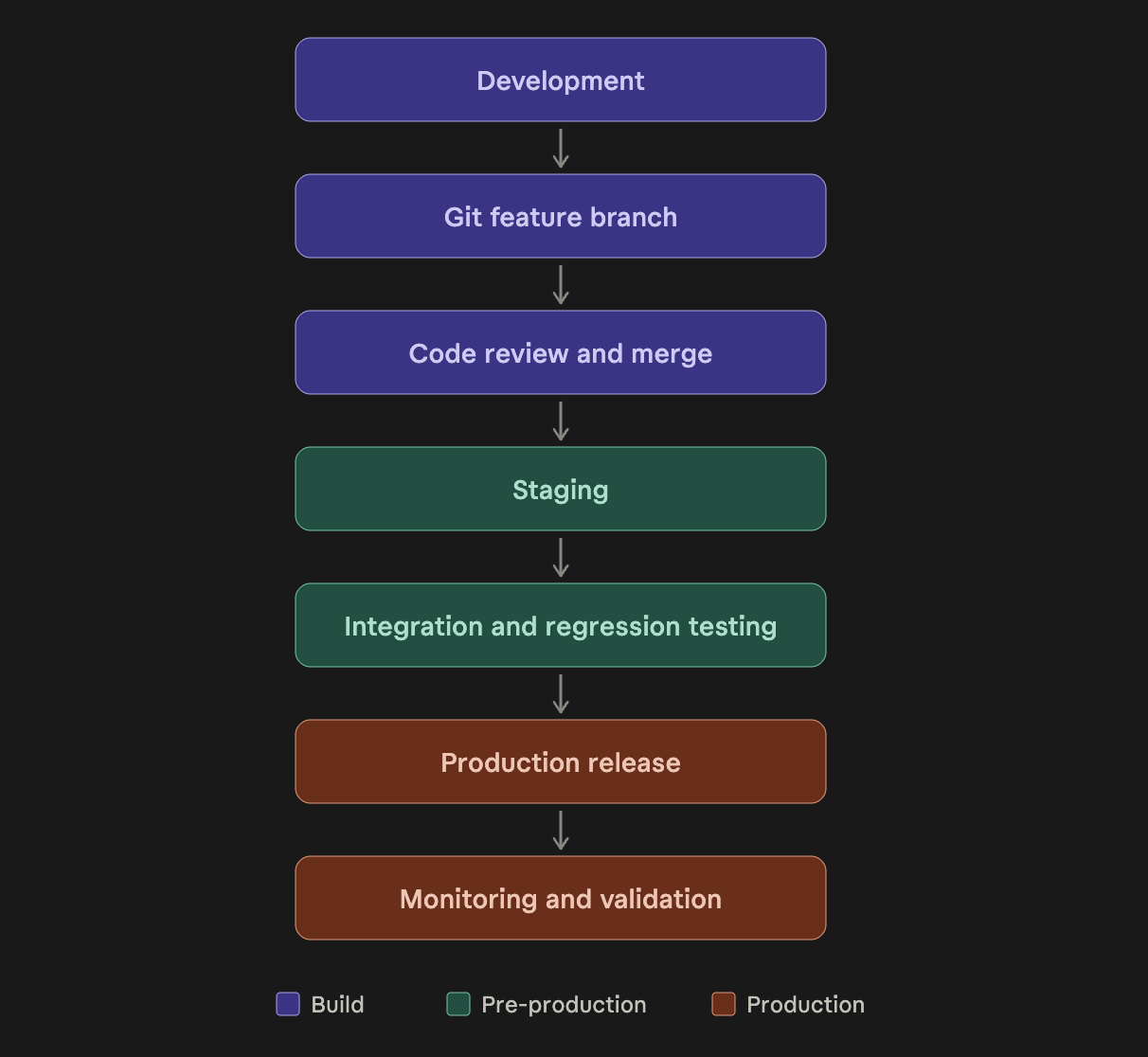
This approach gives engineering teams a controlled path for moving changes into production.
Use Git for AI-generated app version control
Git provides a history of changes, supports collaboration and makes it easier to compare versions.
For AI-generated applications, this becomes particularly important because generated code or application logic can change significantly between iterations.
A version-controlled workflow helps developers:
Track what changed and when.
Review updates before merging.
Compare working and released versions.
Collaborate across development teams.
Restore a previous version when necessary.
DronaHQ supports Git-based application version control through Global Git Sync for supported self-hosted deployments.
It integrates with Git hosting providers such as GitHub, GitLab and Bitbucket.
The documented workflow keeps development, staging and production instances separate. Developers work in Development, push changes to the development branch, move approved changes into Staging and then promote the validated version to Production.
An important deployment consideration: DronaHQ’s current Global Git Sync documentation specifies self-hosted availability and does not list cloud availability. The older single-repository Git Sync feature is deprecated, so teams should use the Global Git Sync documentation when planning a new implementation.
Reference: DronaHQ Global Git Sync.
Maintain release history and rollback options
Version history is useful only when developers can identify and recover a known working version.
DronaHQ maintains two types of app versions:
Working version: The current version being edited.
Released versions: Versions published to beta or production.
Published versions are recorded under:
App Settings → Releases & History
Developers can review previous releases and use the rollback option to restore a released version to the working copy.
One important detail: the documented rollback operation replaces the working copy with the selected released version. It should not be treated as an automatic reversal of every production-side change or database migration.
Before rolling back, preserve any required working changes and consider whether associated data or external system changes also need recovery.
Reference: DronaHQ Versioning and Rollback.
Test before releasing
A useful release process for production-ready AI applications should include:
API connectivity and response validation.
Database query and schema validation.
End-to-end workflow testing.
Role and permission testing.
Regression testing for existing functionality.
For high-impact changes, consider a limited rollout before enabling the update for all users.
Google’s SRE guidance describes canarying as a way to evaluate a change on a limited portion of a service before proceeding with a wider rollout.
Read: Google SRE Workbook – Canarying Releases.
4. Building reusable components for production-ready AI applications
As organizations scale AI-generated app development, another challenge emerges: duplication.
Different teams may create similar vendor forms, approval screens, validation logic and notification workflows.
If every application implements these independently, engineering teams end up maintaining multiple versions of the same functionality.
A better approach is to establish reusable application components and workflows.
What should be standardized?
Start with components that appear across multiple applications:
Common UI elements such as forms, tables and filters.
Shared API connections and integration configurations.
Reusable validation and business logic.
Standard approval and notification workflows.
Common layouts and application templates.
For example, the vendor approval workflow may be required by Procurement, Finance and Compliance applications.
Rather than rebuilding the same approval logic in each application, teams can use a standardized workflow with clearly defined inputs, approval rules and outputs.
This improves consistency and reduces the effort required to maintain multiple production-ready internal applications.
Reuse with governance
Reuse should not mean allowing every developer to modify shared components without review.
Establish ownership for common components and define how updates are tested and released.
A change to a shared vendor validation rule, for example, could affect several applications. It should be tested against all dependent workflows before being promoted.
DronaHQ supports reuse of app components, screens and workflows, along with a library of UI components, templates and workflow recipes.
This provides a foundation for standardizing internal application development rather than rebuilding common functionality repeatedly.
5. AI application maintenance: Monitoring changes and establishing ownership
Deploying an application is not the end of its lifecycle.
AI application maintenance requires continuous monitoring of application health, integrations, user activity and infrastructure performance.
An API may become unavailable. A database query may slow down. An integration may start returning errors after an external system update.
The challenge is identifying what happened, when it happened and who is responsible for resolving it.
This requires both operational monitoring and application change tracking.
What should engineering teams monitor?
For internal applications, monitoring should cover four areas.
Application health
Request failures and response times.
Failed workflow executions.
Application availability.
Unexpected application behavior.
Integration health
API errors and timeouts.
Authentication failures.
Changes in response structures.
Database connection failures.
Application changes
Published releases.
Configuration changes.
Changes to connectors and workflows.
User and administrative activities.
Ownership
Application owner.
Integration owner.
Release approver.
Escalation contact.
Audit logs and operational monitoring are different
Audit logs help answer questions such as who changed an application, which user performed an action and when a particular event occurred.
Operational monitoring helps answer whether the application is healthy, how quickly it responds and whether integrations are failing.
Both are necessary, but they serve different purposes.
DronaHQ supports audit logging through two options:
DronaHQ Managed Audit Logging: Available on the self-hosted version.
External Audit Logging: Allows teams to configure an external logger.
The audit logging documentation describes event details such as timestamps, user email, environment, resource type, resource action and application or automation identifiers.
This can help engineering teams investigate changes and trace platform activities.
For broader application observability, teams should also use their existing monitoring stack for metrics, logs, traces and alerting. Platform audit logs should not be treated as a replacement for application performance monitoring.
A clear ownership model makes these signals actionable. Every production application should have someone responsible for its integrations, releases and ongoing maintenance.
6. Enterprise AI app deployment: Choosing the right deployment model
Enterprise AI app deployment involves more than publishing an application. Organizations must evaluate where applications run, how enterprise data is accessed, what infrastructure controls are required and who is responsible for ongoing operations.
The right deployment model depends on security requirements, data governance policies, network architecture and the organization’s ability to manage application infrastructure.
Three common deployment models are managed cloud, private cloud or VPC, and self-hosted infrastructure.
| Deployment model | How it works | Considerations |
|---|---|---|
| Managed cloud | Platform runs on managed infrastructure | Less infrastructure administration |
| Private cloud / VPC | Deployment runs within a controlled private cloud environment | Greater infrastructure and network control |
| Self-hosted / on-premises | Platform runs on infrastructure managed by the organization | Direct infrastructure and operational responsibility |
Managed cloud
In a managed cloud model, the platform provider operates the underlying infrastructure.
This reduces the amount of infrastructure setup and maintenance required from internal engineering teams.
It can be suitable when the organization’s hosting, security and data requirements are met by the managed service.
Private cloud or VPC
Some enterprises require applications to run within their own virtual private cloud.
This can help align application hosting with existing network boundaries, access controls and cloud governance policies.
It is particularly relevant when applications connect to internal enterprise services that should not be exposed publicly.
Self-hosted internal tools and on-premises deployment
Self-hosted internal tools allow organizations to run the platform within infrastructure they manage, including cloud-hosted virtual machines or on-premises environments.
This provides more direct control over infrastructure placement and network configuration.
For enterprises with specific data governance, network isolation or infrastructure requirements, self-hosted deployment can be an important consideration.
However, it also means the organization needs to plan for infrastructure maintenance, capacity, backups, updates and operational support.
DronaHQ supports managed cloud deployment as well as Enterprise deployment options in a VPC or on-premises environment.
Reference: DronaHQ deployment options.
7. Self-hosted internal tools: Data residency, network isolation and infrastructure requirements
Choosing a deployment model is only the first step.
Engineering and security teams must also understand where application data is stored, how systems communicate and which infrastructure components need to be accessible.
These considerations become particularly important when deploying self-hosted internal tools. Organizations need visibility into where application data is processed, how internal systems communicate and which infrastructure components require external access.
Data residency
Data residency refers to the geographical location where data is stored or processed.
Organizations operating in regulated industries may need to keep certain data within specific jurisdictions.
Before deploying an internal application, review:
Where application data is stored.
Where connected databases are hosted.
Where backups and logs are retained.
Whether data is cached during queries or workflows.
Which external services process application data.
An important distinction is that application hosting and data storage are not always the same thing.
For example, an application may run on one infrastructure while retrieving information from a database hosted separately.
DronaHQ documents that when applications connect to customer-owned or third-party databases, it proxies requests and applies credentials server-side rather than requiring the end user’s browser to connect directly to the database.
The documentation also notes that query and workflow caching can temporarily retain customer data for the configured cache duration.
These details should be included in the organization’s data-flow and residency assessment.
Reference: DronaHQ Privacy, Data Protection and Security Practices.
Network isolation
Internal applications often need to communicate with ERP, CRM, databases and other private enterprise services.
These systems may not be accessible from the public internet.
Network isolation helps restrict communication to approved systems and services.
Engineering teams should define:
Which internal services the application needs to access.
Which inbound connections are permitted.
Which outbound connections are required.
How credentials and secrets are managed.
How administrative access is restricted.
For self-hosted DronaHQ deployments, the documented requirements include SSH access on port 22, HTTP/HTTPS on ports 80 and 443, and optional direct service access on port 8080.
Outbound access to the DronaHQ licensing endpoint is also required.
These are documented platform requirements, not a complete firewall policy. The actual network rules should be designed according to the deployment architecture.
Reference: DronaHQ Self-Hosted Deployment Requirements.
Infrastructure planning for self-hosted deployments
A self-hosted deployment needs more than a server with enough memory to start the application.
The documented minimum requirements include:
| Resource | Minimum requirement |
|---|---|
| CPU | 2 vCPUs |
| Memory | 8 GiB |
| Storage | 60 GiB |
| Operating system | Linux VM, cloud instance or on-premises; macOS also listed |
| Containerization | Docker Engine and Docker Compose |
These are minimum installation requirements, not recommended production sizing for every workload.
Actual capacity planning should account for concurrent users, application activity, workflow execution, database load, storage growth and availability requirements.
DronaHQ’s self-hosted deployment documentation also recommends externalizing databases for stateless deployments to improve maintainability, scalability and reliability.
This is an important consideration when designing infrastructure that needs to scale or recover from failures.
8. How DronaHQ supports production-ready AI applications and enterprise deployment
Taking AI-generated apps from development to production requires a platform that supports the entire application lifecycle.
DronaHQ provides capabilities for application versioning, environment management, reusable components, audit logging and flexible deployment. These capabilities help engineering teams manage production-ready AI applications and enterprise internal tools with greater control over changes, releases and infrastructure.
1. Version history and rollback
DronaHQ maintains working and released app versions.
Published beta and production versions are available in Releases & History, allowing teams to review earlier releases and restore a previous released version to the working copy when required.
2. Development and production governance
DronaHQ supports multiple data environments, such as Development, Staging and Production, allowing teams to isolate testing and development from live data.
For supported self-hosted deployments, Global Git Sync provides a structured workflow for moving application changes across development, staging and production instances.
3. Reusable application components
Teams can reuse screens, UI components and workflows across applications.
This reduces duplicated implementation work and makes it easier to maintain consistent internal application patterns.
4. Audit logging
DronaHQ supports managed audit logging on self-hosted deployments and external audit logging integrations.
These logs help administrators trace platform activities, user actions and changes across applications and workflows.
5. Flexible deployment infrastructure
Organizations can deploy applications on DronaHQ managed cloud or choose Enterprise deployment options such as VPC and on-premises hosting.
This allows deployment decisions to align with existing infrastructure and data governance requirements.
6. Secure integration management
DronaHQ connects to enterprise databases and APIs, with credentials handled server-side for connected customer-owned and third-party data sources.
This provides a way to build internal applications around existing enterprise systems without requiring direct database access from the end user’s browser.
Bringing an AI-generated vendor management app into production
Let’s return to the application that started this discussion.
The ERP team has changed its API response, and the vendor management application is failing.
A controlled AI application maintenance process would look like this:
Step 1: Identify the dependency
Review the affected API endpoint, response structure and workflows that depend on the vendor status field.
Step 2: Update the integration
Modify the API mapping or application logic to support the new ERP response.
Step 3: Save and track the change
Record the application update in the appropriate development version and Git branch, where Global Git Sync is configured.
Step 4: Validate in staging
Test vendor records, status filters, compliance checks and approval workflows against the updated ERP integration.
Step 5: Release the approved version
Promote the validated changes through the team’s release process and publish the new application version.
Step 6: Monitor after release
Review application behavior, integration failures and relevant audit events. If an application regression is identified, use the documented version recovery process and assess any associated data or integration changes separately.
The result is a controlled maintenance process rather than an emergency production fix.
9. Production readiness checklist for AI-generated apps
Before deploying AI-generated apps for enterprise use, engineering teams should validate the following.
Application and integrations
Versioning and releases
Governance and AI application maintenance
Infrastructure and security
Conclusion: Build, deploy and maintain production-ready AI applications
AI-generated apps are changing how quickly engineering teams can build internal applications. But moving from a working prototype to a production-ready application requires more than generated code.
Enterprise applications need reliable integrations, version control, controlled releases, security governance, monitoring and continuous AI application maintenance.
For organizations deploying production-ready AI applications, establishing a repeatable development and deployment process is essential. This becomes even more important when managing self-hosted internal tools or applications connected to business-critical enterprise systems.
DronaHQ brings application development, reusable components, version management, audit logging and flexible deployment options into a governed platform.
Whether you’re building AI-generated apps for internal teams or planning enterprise AI app deployment at scale, the focus should be on building applications that remain manageable, secure and reliable long after their first release.
Build, deploy and maintain production-ready applications with DronaHQ.
Related Articles